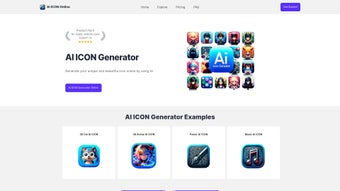

Download AI ICON Online – Free AI‑Powered Icon Generator
Overview
AI ICON Online is a cloud‑based icon creation platform that harnesses the power of OpenAI’s DALLE‑3 model to turn plain‑language prompts into polished, ready‑to‑use graphics. The service is tailored for graphic designers, UI/UX specialists, developers, and anyone who needs custom visual assets without spending hours in a traditional vector editor. Because the entire workflow runs inside a modern web browser, there is no need to download bulky software, manage license keys, or worry about operating‑system compatibility.
Users simply open aiicononline.com, type a concise description of the icon they envision, and watch the AI generate up to five variations within seconds. The platform is completely free, making it an attractive option for freelancers, startups, and hobbyists who are conscious of budget constraints. Frequent updates introduce new artistic styles, improve rendering speed, and expand the library of export formats, which currently includes SVG, PNG, and ICO.
While the quality of the output depends on how specific the prompt is, the built‑in prompt‑assistant offers suggestions and example phrases to guide users toward better results. Minor loading hiccups can occur on slower connections, but a quick page refresh usually resolves the issue. Overall, AI ICON Online delivers a fast, secure, and cost‑free solution for generating custom icons that can be instantly integrated into web projects, mobile apps, or branding kits.
Key Features & Benefits
- AI‑driven generation using DALLE‑3 for photorealistic and vector‑style icons.
- Fully web‑based – no downloads, installations, or system requirements.
- Multiple export formats: SVG for scalability, PNG for raster use, ICO for favicons.
- Prompt‑assistant with sample phrases and style tags to improve result accuracy.
- Free tier with unlimited icon creation, no hidden fees or subscription lock‑ins.
- Instant preview of up to 5 variations per prompt, enabling quick iteration.
- Responsive design works on desktop browsers, tablets, and smartphones.
- Regular updates that introduce new icon styles, colour palettes, and AI optimisations.
- Secure, GDPR‑compliant processing – images are generated server‑side and not stored permanently.
- Community gallery where users can share successful prompts and discover inspiration.
These capabilities translate into tangible advantages for both designers and developers. First, the AI engine removes the need for manual drawing, cutting down icon‑creation time from hours to minutes. Second, the SVG output guarantees that icons remain crisp at any resolution, a critical factor for responsive design and high‑density displays.
Third, the free‑forever model democratizes access to high‑quality graphics, allowing small teams and solo creators to maintain a consistent visual language without stretching their budgets. The prompt‑assistant is especially valuable for non‑designers; by suggesting adjectives such as “flat”, “line‑art”, or “neon”, it steers the AI toward a style that matches the project’s aesthetic. Finally, the regular update cadence ensures the platform stays current with emerging design trends and AI improvements, keeping users ahead of the curve while preserving a secure, privacy‑first environment.
Installation, Usage & Compatibility
Getting Started – No Installation Required
Since AI ICON Online is a cloud‑hosted service, the only prerequisite is a modern web browser (Chrome, Edge, Firefox, Safari) and a stable internet connection. Navigate to aiicononline.com, where a clean dashboard greets you with a large text box for your prompt and a prominent “Generate” button. No sign‑up is mandatory for the free tier, though creating an account unlocks the ability to save favorite prompts, access the community gallery, and receive update notifications.
Step‑by‑Step Workflow
- Define the concept: Write a concise description of the icon you need, e.g., “flat style calendar icon with a red dot on the 15th”.
- Add style modifiers (optional): Include keywords like “outline”, “gradient”, or “material design” to guide the AI.
- Press Generate: The server processes the request and returns up to five variations within 10‑15 seconds.
- Review & refine: Use the “Regenerate” or “Edit Prompt” buttons to tweak the description if the results aren’t perfect.
- Download: Click the download icon beneath your chosen result to save the file in SVG, PNG, or ICO format.
Compatibility Across Devices
Because the application runs in the browser, it is compatible with all major operating systems: Windows 10/11, macOS Monterey and later, Linux distributions, as well as mobile platforms such as Android 9+ and iOS 13+. The responsive layout automatically adjusts button sizes and preview panels for touch interaction on smartphones and tablets, ensuring a seamless experience whether you’re at a desk or on the go. The only technical limitation is the need for a reasonably fast connection; on slower networks, generation times may increase, but the tool will still function. Security‑wise, all data is transmitted over HTTPS, and the service complies with GDPR by not permanently storing prompts or generated images unless the user explicitly saves them.
Conclusion, Pros & Cons, FAQ & Call to Action
Pros
- Completely free with unlimited icon generation.
- No installation – works in any modern browser.
- High‑quality SVG output suitable for responsive design.
- Prompt‑assistant helps non‑designers create precise descriptions.
- Regular updates add new styles and improve AI accuracy.
- Secure, GDPR‑compliant processing and no permanent data storage.
Cons
- Result quality depends heavily on prompt specificity.
- Occasional loading errors on unstable internet connections.
- Limited control over fine‑grained vector editing (post‑processing may be required).
- No offline mode – an internet connection is mandatory.
- Advanced styling may require multiple iterations to perfect.
Frequently Asked Questions
Is AI ICON Online really free?
Yes. The core icon generation service is completely free with no hidden subscription fees. Users can create and download an unlimited number of icons without paying.
What file formats can I export?
AI ICON Online provides SVG for scalable vector graphics, PNG for raster images, and ICO for favicon use. All formats are downloadable with a single click.
Do I need to create an account?
No, you can generate icons anonymously. However, signing up lets you save prompts, access the community gallery, and receive update notifications.
How can I improve the quality of the icons?
Provide detailed prompts that include style cues (e.g., “flat”, “line‑art”, “gradient”), colour specifications, and any thematic elements. Experiment with synonyms and adjust the prompt based on the preview results.
Is my data safe?
AI ICON Online follows GDPR guidelines. Prompts and generated images are processed on the server and are not stored permanently unless you choose to save them to your account.
Final Thoughts & Call to Action
AI ICON Online fills a clear gap in the design toolbox by offering a fast, free, and AI‑enhanced way to produce custom icons without the steep learning curve of traditional vector editors. While it does rely on well‑crafted prompts and requires an internet connection, the benefits—instant scalability, cross‑platform accessibility, and zero cost—outweigh the minor drawbacks for most users. Whether you’re a seasoned designer looking to speed up repetitive tasks or a developer needing quick visual assets for a prototype, AI ICON Online is ready to serve.
Ready to streamline your icon workflow? Visit AI ICON Online now, type your first prompt, and download a high‑resolution icon in seconds. Experience the future of graphic creation—free, secure, and powered by AI.



.png)



